Your team of Claude agents.

Claude Code, Codex and Grok side by side in one window. And a team of agents working on your Mac and your server.

Download for Mac28.7 MB

Apple Silicon. Also for Intel Mac (29.7 MB) and Windows x64 (6.9 MB).v2.8.117, 10 November 2026, free

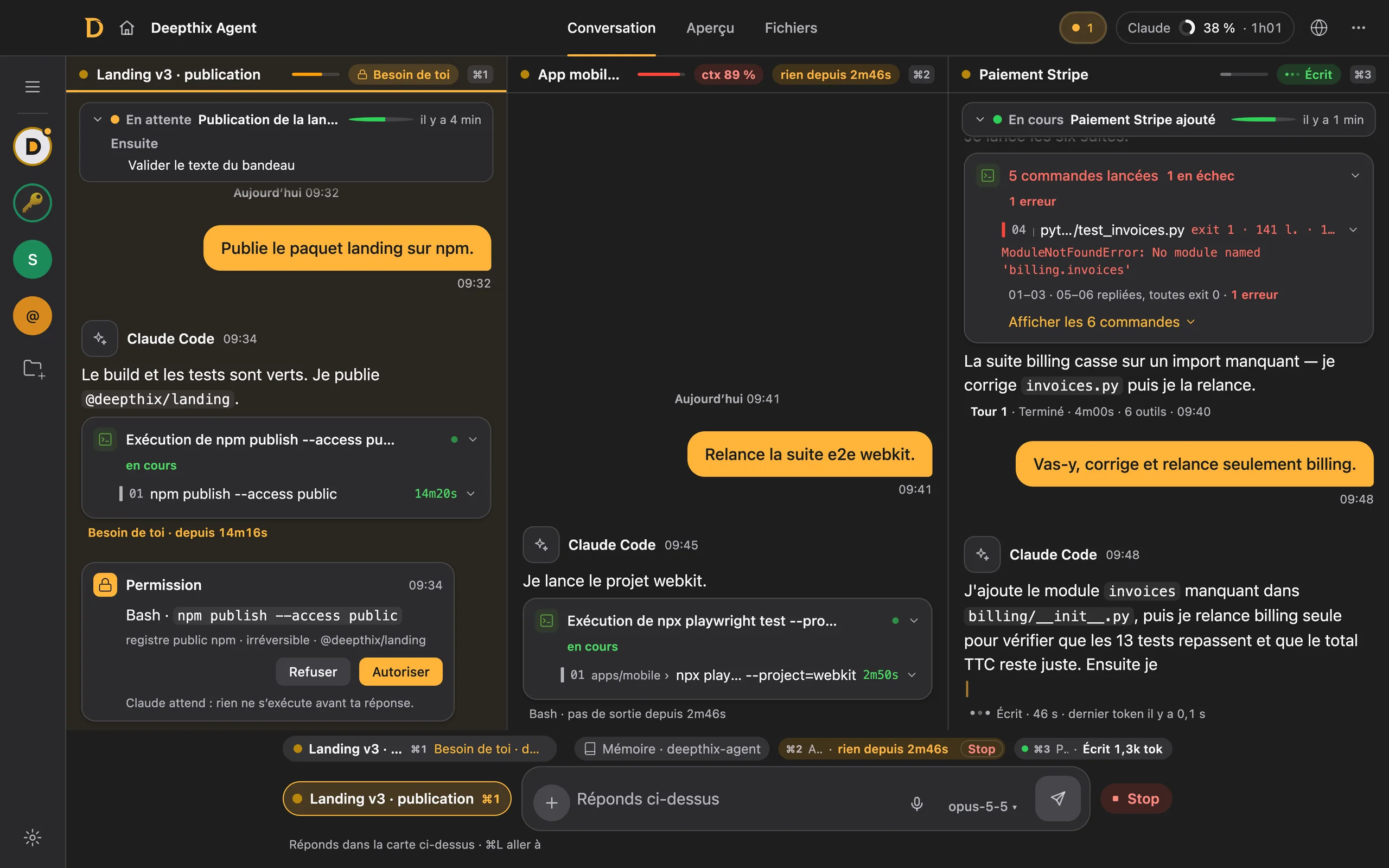
Deepthix Agent in dark theme: three Claude Code conversations side by side, a permission waiting in the first, one composer at the bottom.

Real screenshots of the app (French interface), with demo data.Swipe a screenshot to pan across it.

Free

Three conversations.
One composer.

Every conversation is a real CLI running on your machine. Deepthix lines them up, names them, and shows you who is waiting on you.

Close-up of the bottom of the window: the three conversations as chips, the one that needs you, and the single composer addressed to “Landing v3 · publication”.
⌘1 ⌘2 ⌘3 hand the composer to a column. The others keep working meanwhile.

Why Deepthix Agent

Stay in control.

A command that asks for permission stops and waits in its own card. Nothing runs before you answer.
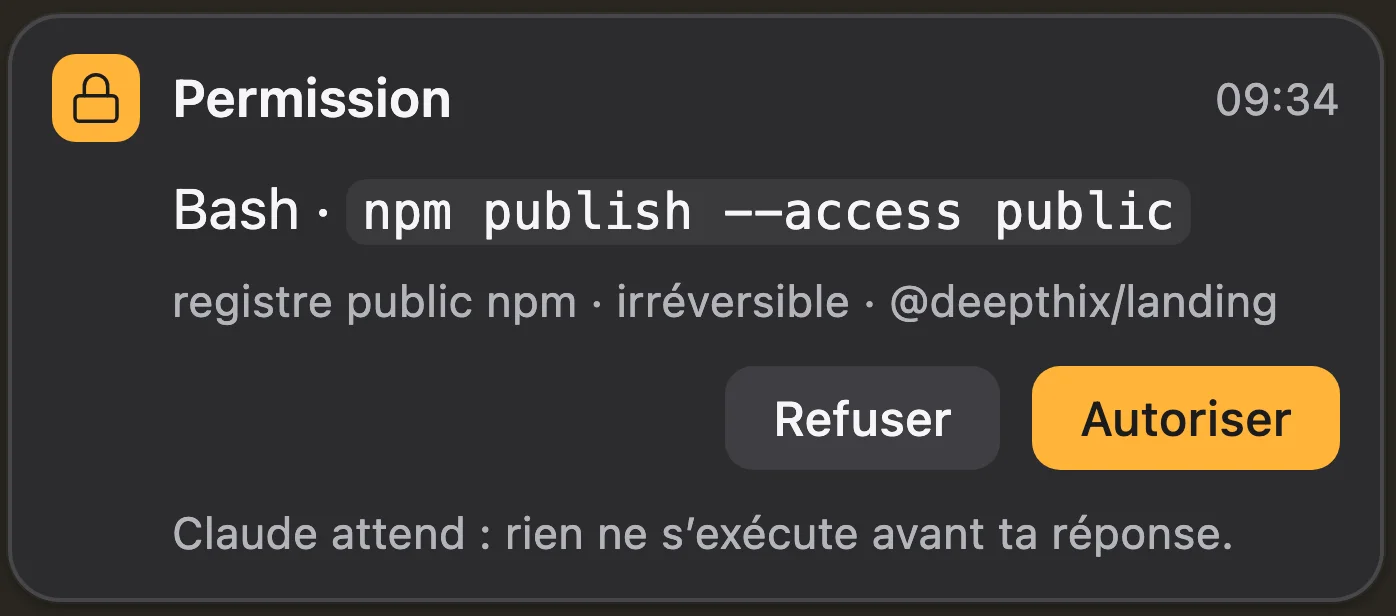
Close-up of a Permission card: Bash, npm publish, the Refuse and Allow buttons.

Claude Code, Codex, Grok.

The engine is picked per session, with its model: Opus 5.5 by default, Fable 5.2, Sonnet 5.5, Haiku 5.5.
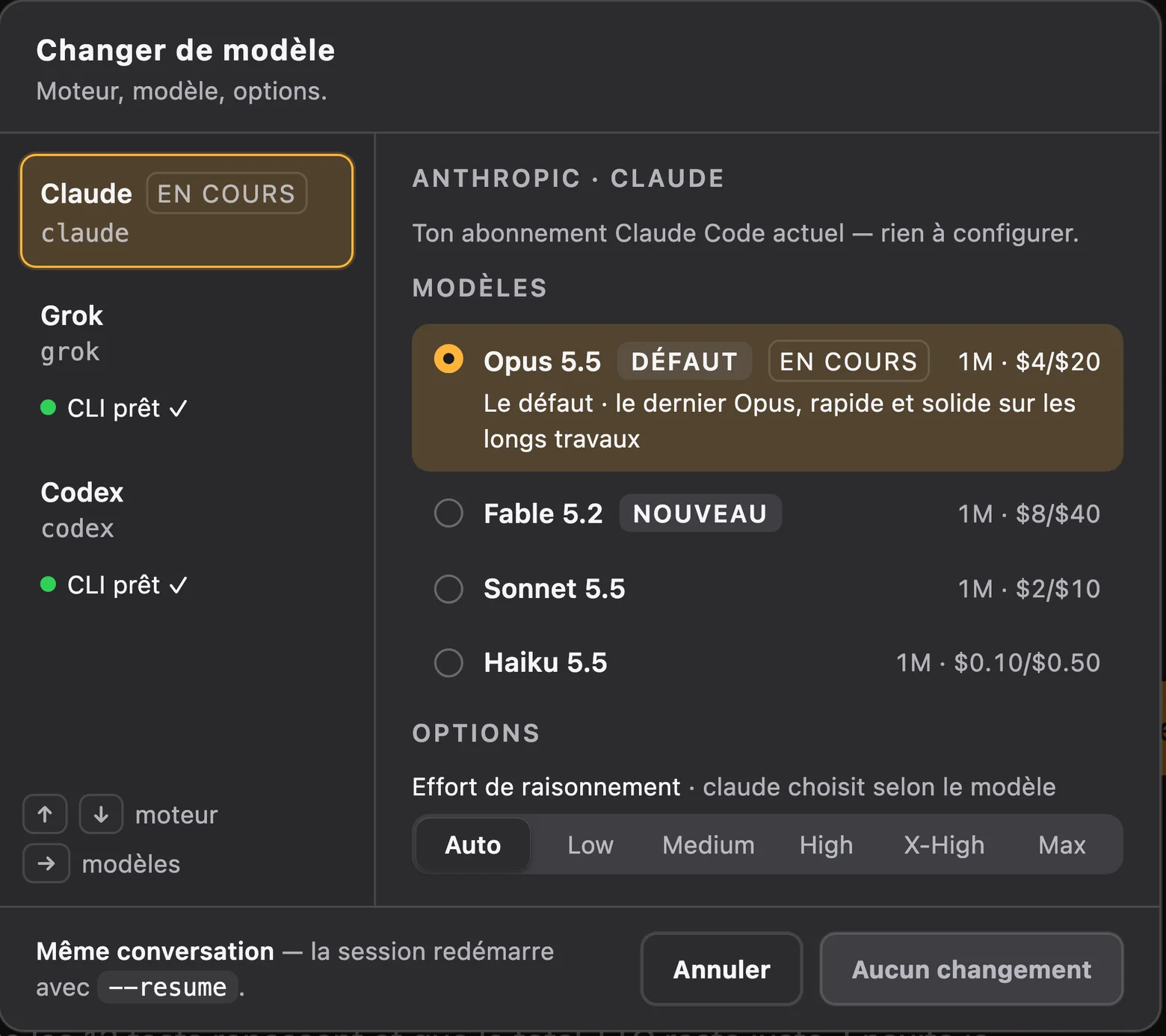
The “Change model” picker: Claude, Grok and Codex ready on the left; on the right Opus 5.5 as default, Fable 5.2, Sonnet 5.5 and Haiku 5.5.
Pro

A team that works while you sleep.

Persistent Claude agents on your Mac and your VPS, on your own subscription. You talk to them on Telegram.

The whole team, live.

The Chief on your Mac, team leads each running their own team on the VPS, and what they say to each other, as it happens.
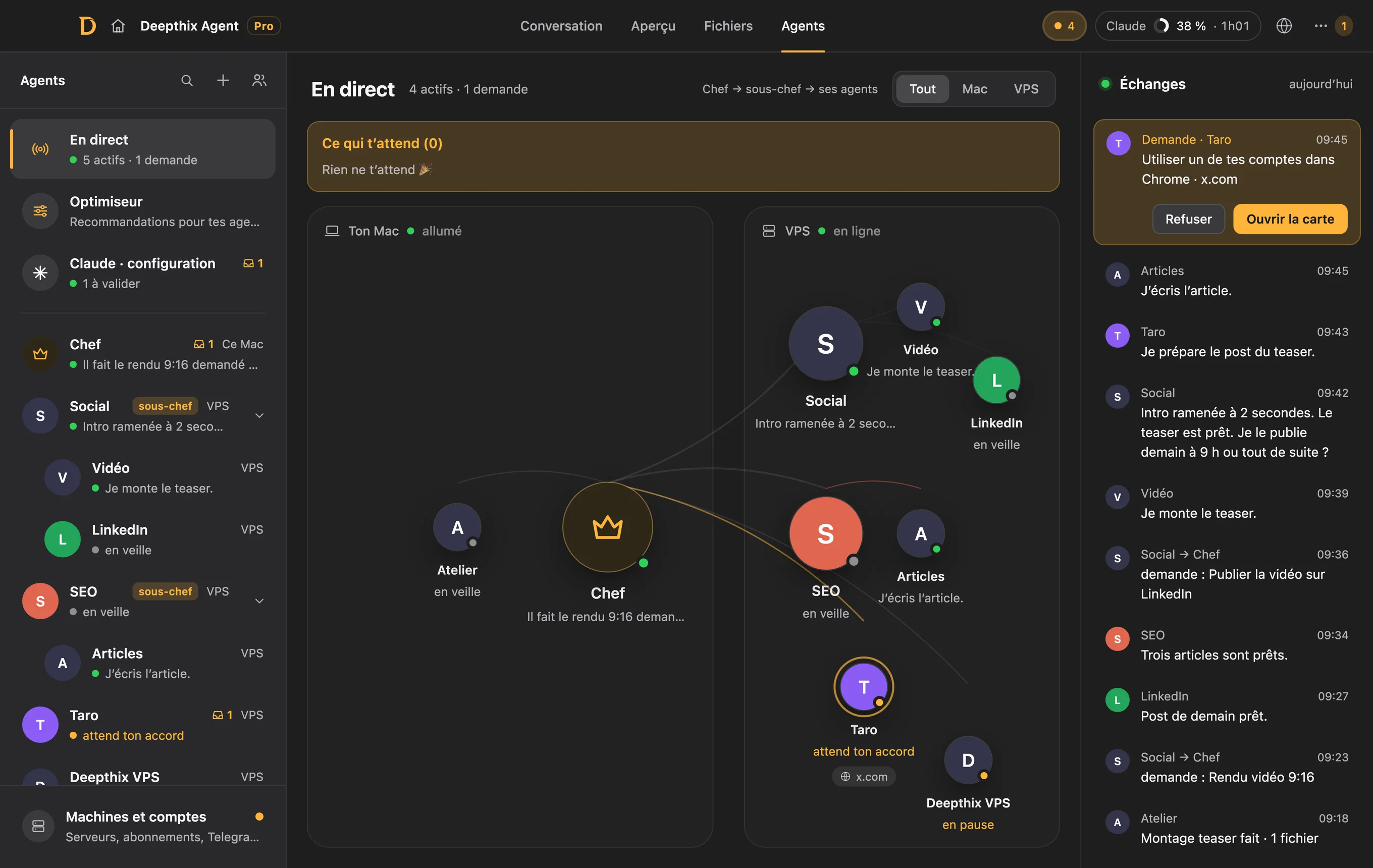
The Live screen: the Chief on the Mac, the Social and SEO team leads on the VPS linked to their agents, and the exchange feed on the right.

What is waiting. One answer, one click.

Questions, approvals, escalations from team leads: one panel, oldest first. Click an option or type.
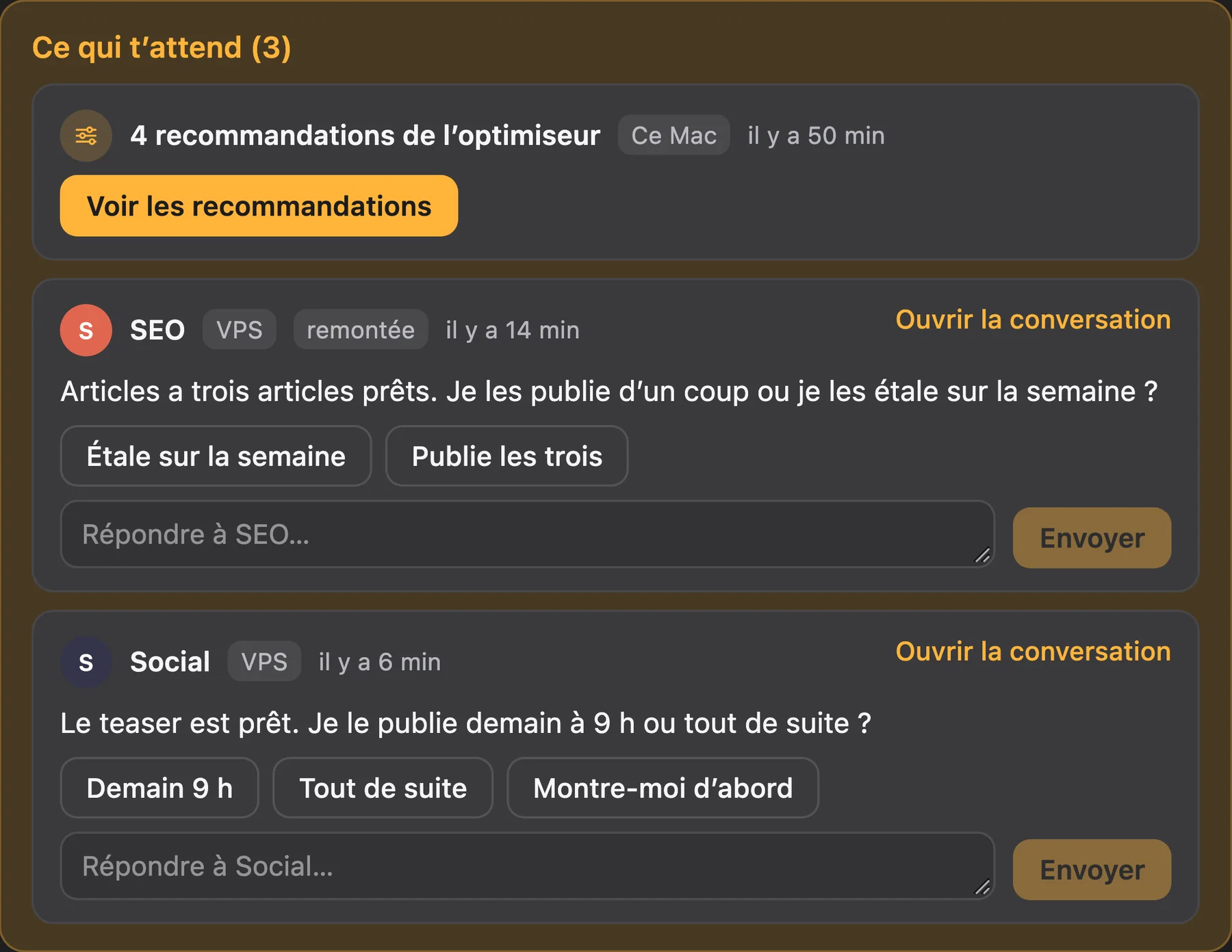
The What is waiting panel: the optimiser recommendations, a question escalated by the SEO team lead and a question from Social, each with its answer buttons.

The Optimiser reviews everything.

It analyses seven days of work from every agent and ranks its recommendations by impact. You apply in one click, and what you apply can be undone.
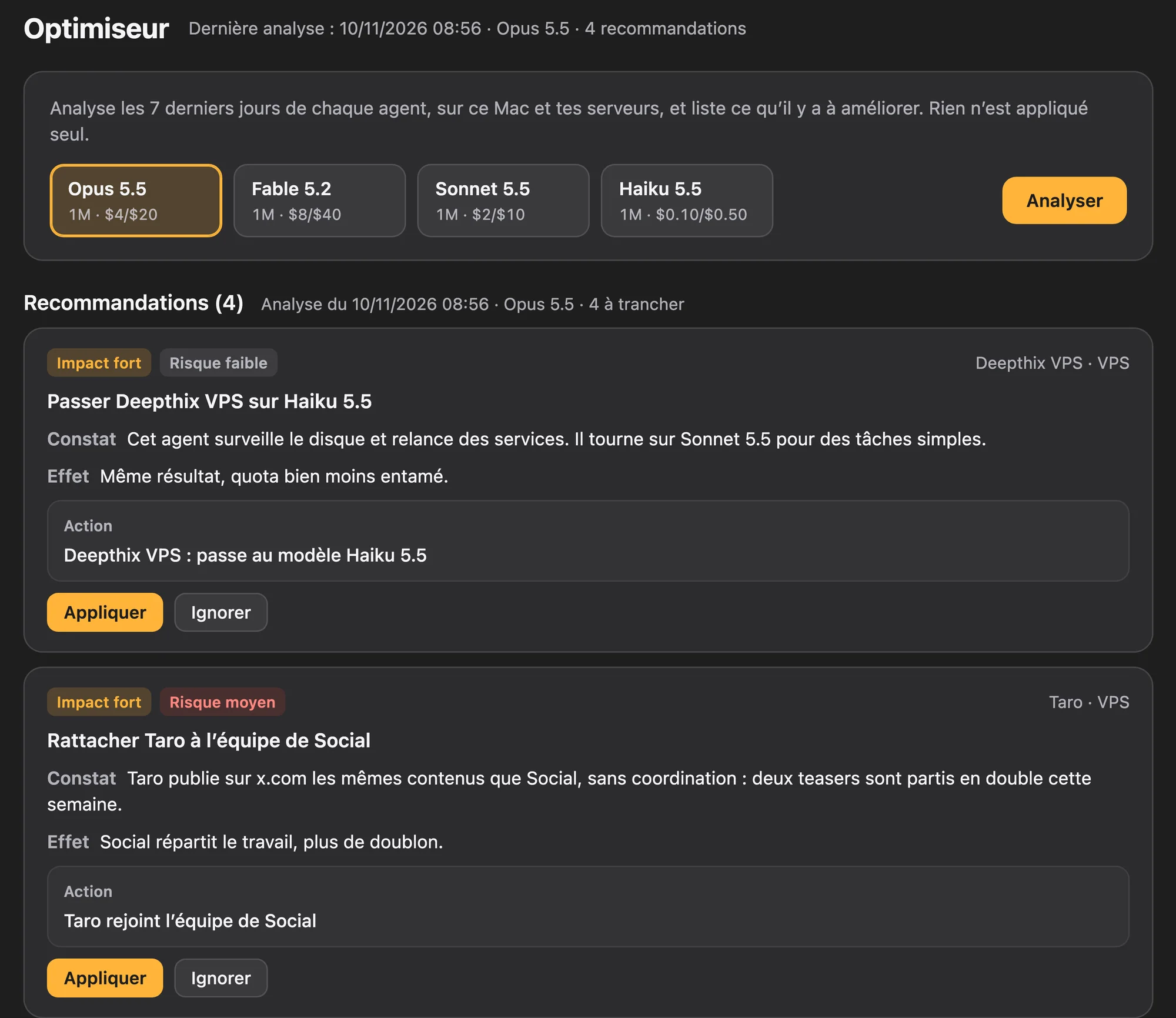
The Optimiser: the choice of analysis model, then two recommendations with their finding, their effect, the exact action and the Apply and Ignore buttons.

One thread, on Telegram and in the app.

The same conversation everywhere, in order. The files the agent produces arrive as attachments.
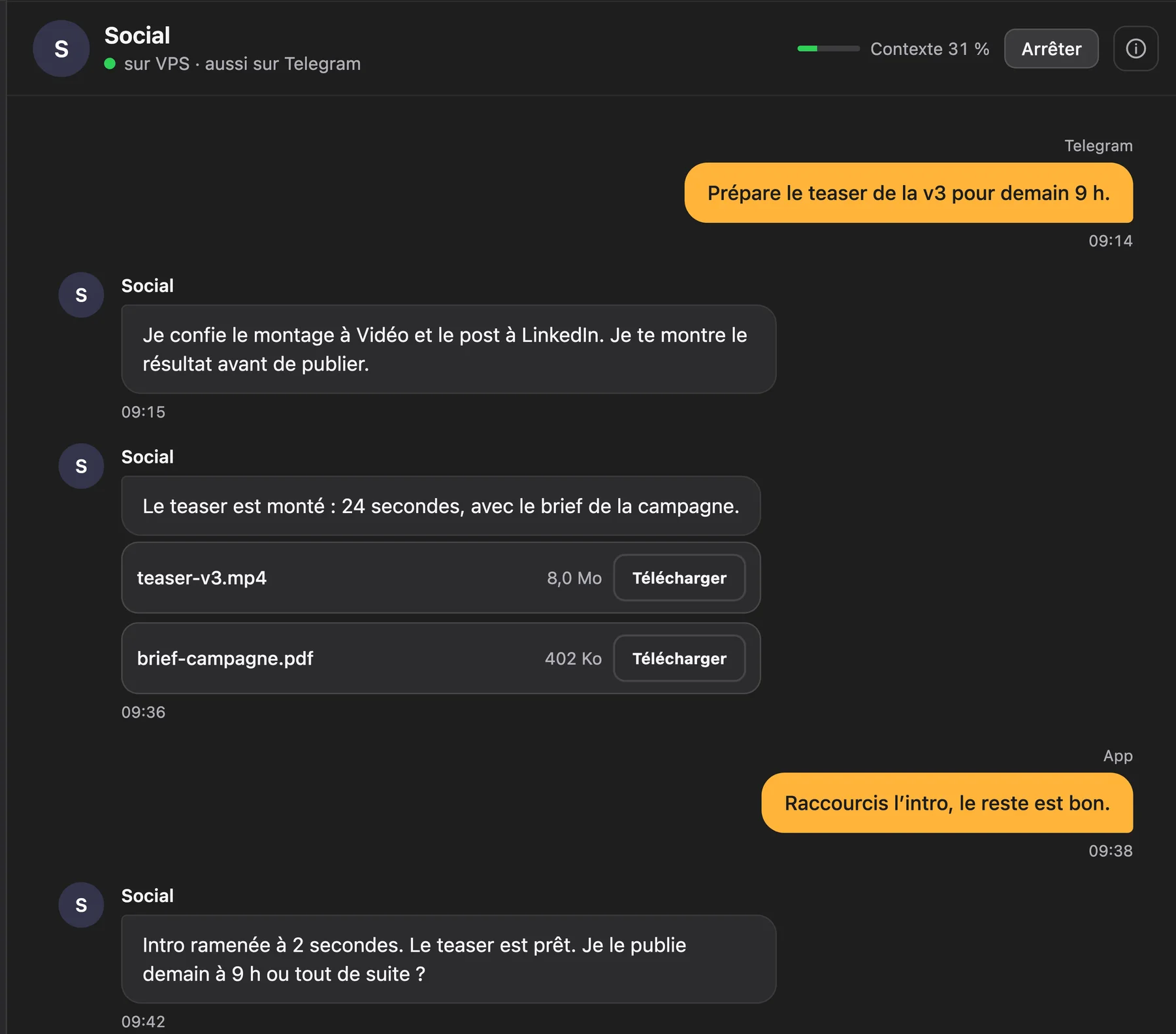
The Social agent’s conversation: a message sent from Telegram, two attached files with their Download button, a reply sent from the app.

Several Claude accounts. Zero cutoff.

When one account hits its limit, the conversation carries on with the next.

Your quota, at a glance.

The chip in the title bar reads your Claude account: 5-hour window, week, next reset.

Close-up of the title bar: one pending request, and the Claude chip at 38%, reset in 1 h 01.
  1. Personal hits its 5-hour limit.
  2. Deepthix switches to the Pro account.
  3. Your message is re-sent, without asking you anything.

Rotation does the rest.

Add your accounts, turn on “Rotate accounts”, or pin the one you want.
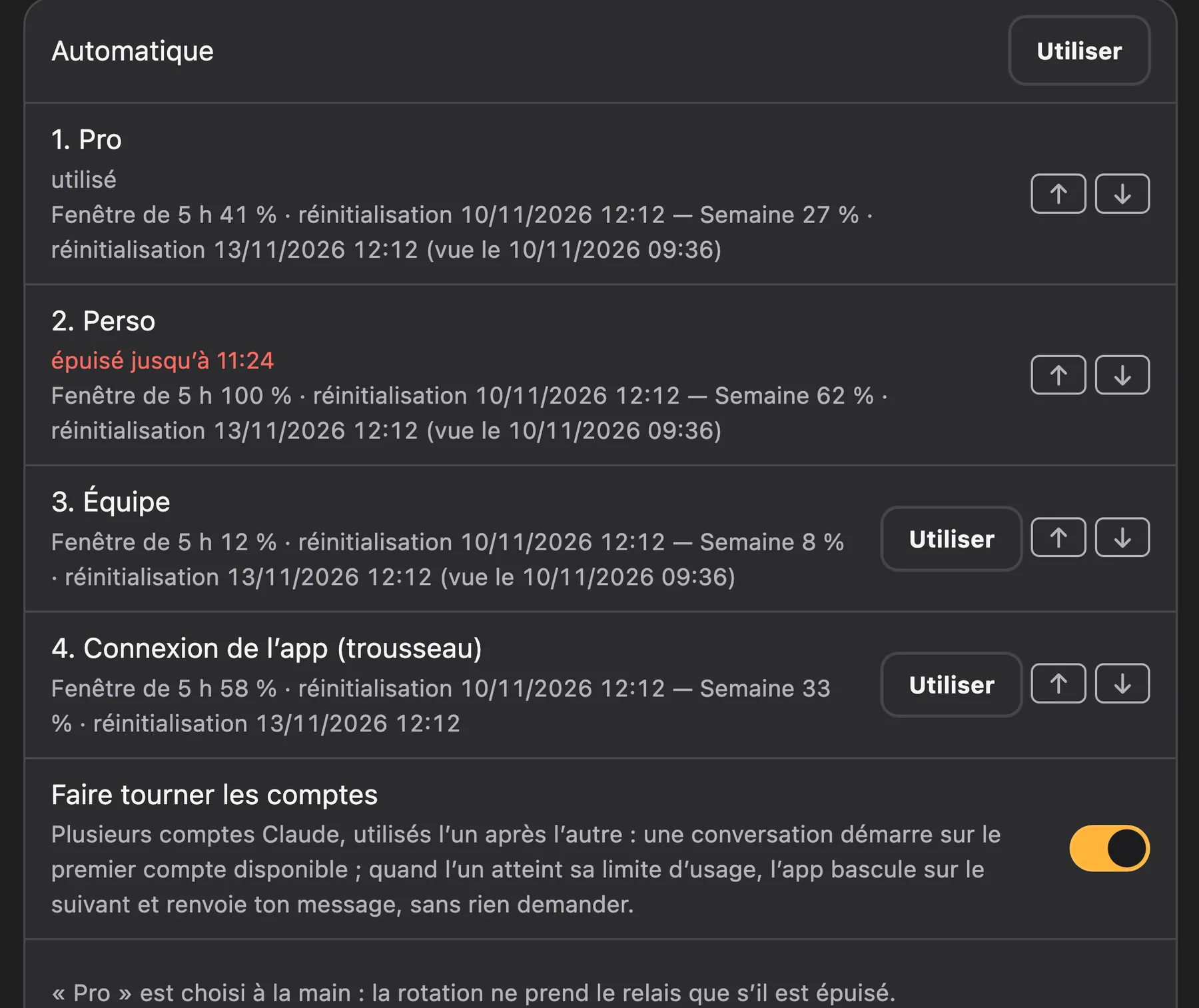
Settings › Subscriptions: four Claude accounts with their 5-hour window and their week, one of them exhausted, and the Rotate accounts switch turned on.

Ready in two minutes.

If your terminal already is.

  1. Install

    One .dmg or one .exe. On first launch the app checks that claude, Node and Git are there and tells you what is missing.

  2. Point it at a repo

    Pick a folder: that is a project. It gets an icon, a colour, and finds its sessions again next launch.

  3. Write

    One column, one message. Open a second, a third: they run at the same time, and the ones waiting on you rise to the top.

What you need: the engine’s CLI, already signed in. Claude Code with a Claude Pro or Max subscription (or an API key), the Codex CLI, the Grok CLI. Deepthix drives your CLIs, it does not replace them.

Free to code.
Pro for your team of agents.

Free

€0
forever
  • The whole app, no feature held back
  • Unlimited parallel sessions
  • Claude Code, Codex, Grok, browser, accounts in rotation
  • Up to 3 projects
Download

Pro

€19
per month
  • Everything in Free
  • Unlimited projects
  • Agents mode: your team on Mac and VPS
  • Email support
Go Pro

Pro is activated in the app, Settings › Pro account: pay in the browser, sign in with an email link. Deepthix never resells you tokens: those you pay your provider, exactly as you do today.

Every detail.

The app, free

Run as many as you want
Three conversations on screen, every other one still working behind them. The number of parallel sessions is capped nowhere, not even on Free.
Columns side by side
⌘1 ⌘2 ⌘3 hand the composer to a column: amber wash, its name in the chip, no doubt about where it goes. The others keep working meanwhile.
What is waiting, first
On open, the home screen lists pending requests: allow or refuse without hunting for the right column.
Subagents in plain sight
Delegated work shows up in the column, with its tool and its state. Nothing runs out of sight.
Task board
Overview › Tasks: to do, in progress, done, per project, with milestones.
Automatic names
No more “session 3”: every conversation gets a title drawn from the transcript, every project an icon. ⌘L searches everywhere.
A browser it drives
A panel inside the window: the session opens a page, reads, clicks, fills in, and you watch it live. A Chrome Deepthix launches or your own through the extension, shared tabs that say who opened them. ⌘⇧B opens and closes the panel.
Never lose a thread
Every conversation gets a title written from what it is doing, every project an icon and a colour. Recents are one click away, even from another project.
Dispatcher
All your sessions in one chat view.
Shared skills
The same skills for Claude, Codex and Grok.

Agents mode, Pro

One Telegram bot per agent
All in one group: they only speak when mentioned.
Autonomous, under your control
Free inside their folder. For anything sensitive, a ✅ / ❌ approval on Telegram or in the app, and they remember what you allowed.
The Chief, on your Mac
A task queue, and it runs what the VPS agents cannot: renders, video editing.
Your VPS, nothing exposed
Installed over SSH, encrypted tunnel. Sandbox and refusal rules.
Clean Git
One branch per agent, a PR, a real, traceable deployment.
Soul, memory, skills
Each agent has a profile, a memory that lasts and the team’s shared skills. Scheduled tasks, review, search across its sessions.
A browser for the agents
They browse with copies of the logins from your Mac’s Chrome: no password to hand over.
Quota guard
Agents run on your Claude subscriptions, with the same rotation as the app: when one hits its limit, the next takes over.

Quota

Quota chip
In the title bar: 5-hour window, week, next reset.
Settings › Engines
Default model, 1M window off, subagent model, queue mode.
Settings › Subscriptions
Add your accounts, turn on “Rotate accounts”, or pick the “Account in use” by hand. You see what each one has spent.

Questions.

Does my code leave my machine?

No. Deepthix Agent launches your CLIs on your machine and reads the transcripts they already write locally (~/.claude/projects for Claude Code). No prompt, no file goes through a Deepthix server. The app's only outbound requests: the update check, and your licence check if you are on Pro. In Agents mode, the VPS is yours, reached through an SSH tunnel.

Which engines?

Claude Code, Codex and Grok, each through its own CLI, chosen session by session. Two columns can run on two engines. Agents mode itself runs on Claude Code.

Do I need to install anything else?

Yes: the CLI of whichever engine you want, already signed in. For Claude Code, a Claude Pro or Max subscription, or an Anthropic API key. On first launch the app checks what is there and tells you what is missing.

How does it help with my quota?

In Settings › Engines: an explicit default model, the 1M window off (conversations compact far sooner), a dedicated subagent model, and a queue that caps how many turns are in flight. In Settings › Subscriptions: several Claude accounts, and rotation switches to the next when one hits its limit. And the quota chip in the title bar reads your account before you launch four sessions.

How do updates work?

On launch the app asks agent.deepthix.com for the latest signed version, checks the Ed25519 signature and installs it on the next restart. You can check by hand or switch it off in Settings › Updates. It is the same channel the buttons on this page point at.

Is the app signed by Apple?

Not yet. Builds are ad-hoc signed, not notarised: on the very first launch, right-click → Open rather than a double-click. macOS never asks again.

What exactly does Pro change?

Two things: projects go from 3 to unlimited, and Agents mode opens up. Everything else is in Free and stays there. Pro is taken in the app, Settings › Pro account.

Windows and Intel Mac?

All three targets are built for every release: an Apple Silicon .dmg, an Intel .dmg and a Windows x64 .exe installer. The app is developed and tested daily on Apple Silicon; treat the other two as working but less exercised.

Open it. Point it at a repo. Write.

If Claude Code already works in your terminal, it already works here.

v2.8.117, 10 November 2026. The same version for all three, the same day. latest.json